 By Santosh Kumar
 SkillRack Login is the gateway to one of India’s popular online programming and assessment platforms designed for students preparing for coding tests and campus placements. The platform allows users to practice programming, take aptitude tests, participate in coding challenges, and track performance through analytics tools.
Students can access the platform through the official website: https://www.skillrack.com/faces/login.xhtml
SkillRack is widely used by engineering colleges and training institutions to improve students’ coding skills and automate placement preparation activities.
What is SkillRack?
SkillRack is an online learning and assessment platform hosted by PeeCee Castle Software Services Pvt. Ltd., created to enhance programming and problem-solving abilities among students. The system supports hands-on learning through coding exercises, tests, and performance analysis tools.
The platform mainly focuses on:
- Programming skill development
- Aptitude and logical reasoning practice
- Coding assessments for colleges
- Campus recruitment preparation
- Automated evaluation and ranking
Many colleges provide SkillRack accounts directly to students through their Training and Placement (T&P) departments.
Key Features of SkillRack Portal
After completing the SkillRack login process, users can access several learning and evaluation tools:
- Programming Practice
Students can practice languages such as:
- C
- C++
- Java
- Python
- SQL
Programs are categorized based on difficulty levels and topics for structured learning.
- Daily Coding Challenges
The platform provides regular coding problems and MCQ tests to help students build daily practice habits and improve logical thinking.
- Learning, Practice & Assessment Modules
SkillRack works through three major modules:
- Learning Module – tutorials and guided exercises
- Practice Module – topic-based programming tracks
- Assessment Module – scheduled tests by colleges
- Analytics and Performance Reports
Students and faculty can view detailed reports showing strengths, weaknesses, and improvement areas.
- Placement Preparation
SkillRack helps institutions automate recruitment workflows and evaluate candidates efficiently through online assessments.
How to Access SkillRack Login
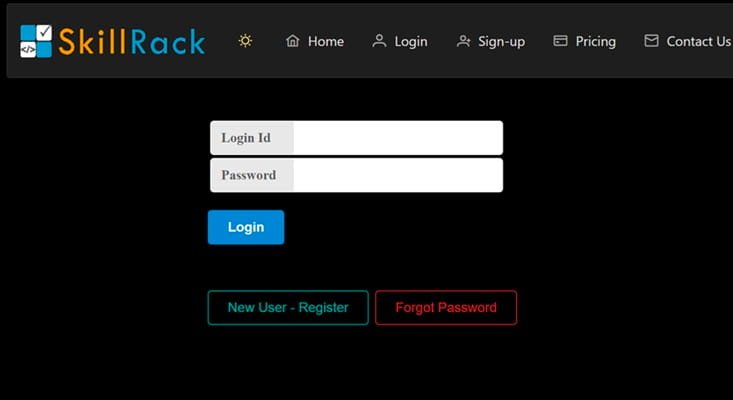
Follow these simple steps to log in:
- Visit the SkillRack login page.
- Enter your Login ID/User ID.
- Type your Password.
- Click Login.
- Access your dashboard and start practicing.
Most users receive login credentials from their college or training institute.
SkillRack Registration Process
Unlike many platforms, SkillRack accounts are often created by colleges.
Steps for new users:
- Contact your college Training & Placement cell.
- Receive User ID and temporary password.
- Log in for the first time.
- Change password and complete profile setup.
This system ensures verified student participation in assessments.
How to Reset SkillRack Password
If you forget your password:
- Open the login page.
- Click Forgot Password.
- Enter registered email or login ID.
- Follow the reset link sent to your email.
- Create a new password.
The platform uses secure authentication measures to protect user accounts.
Benefits of Using SkillRack
SkillRack offers several advantages for students and institutions:
- Improves programming skills through hands-on practice
- Helps prepare for technical interviews
- Provides real-time performance analytics
- Encourages consistent learning via challenges
- Automates placement assessments
- Offers certificates for completed modules
Regular practice on SkillRack helps beginners build coding fundamentals and logical reasoning abilities.
SkillRack Dashboard Overview
After login, users typically see:
- Programming section
- MCQ and aptitude tests
- Daily challenges
- Leaderboards and rankings
- Reports and performance graphs
- Profile statistics and achievements
Gamification features like medals and rankings motivate students to improve performance.
Who Can Use SkillRack?
SkillRack is mainly designed for:
- Engineering students
- College placement candidates
- Beginners learning programming
- Training institutes and recruiters
Users must generally be students aged 15 years or above to register and use services.
Conclusion
The SkillRack Login portal serves as a powerful learning and assessment platform for students aiming to strengthen coding skills and prepare for campus placements. With structured learning modules, daily challenges, and performance analytics, SkillRack helps learners build consistency and technical confidence.
Whether you are a beginner programmer or preparing for recruitment tests, SkillRack provides a practical environment to learn, practice, and compete — making it a valuable tool in today’s competitive tech education landscape.
FAQs About SkillRack Login
Q1. What is SkillRack login used for?
SkillRack login allows students to access coding practice programs, aptitude tests, and placement preparation tools online.
Q2. How do I get SkillRack login credentials?
Most colleges provide login credentials through their Training and Placement cell.
Q3. Can I create a SkillRack account myself?
Usually, accounts are created by institutions, but availability may vary depending on access policies.
Q4. What programming languages are available on SkillRack?
The platform supports C, C++, Java, Python, SQL, and other programming tracks.
Q5. Is SkillRack free to use?
Basic access may be provided through colleges, while some premium plans are available depending on features.
Q6. What should I do if SkillRack login is not working?
Check login credentials, reset your password, ensure internet connectivity, or contact your institution administrator.