 By Santosh Kumar
 HRMS Punjab is officially known as the Integrated Human Resource Management System, or iHRMS Punjab. It is a central human-resource and payroll-management platform used by Punjab government departments and participating government organisations.
The system maintains information relating to employee records, salary, General Provident Fund, Group Insurance Scheme, leave, income tax, property returns, annual appraisal, postings, promotions and arrears. It is also integrated with the state’s Integrated Financial Management System and several other government applications.
iHRMS Punjab is designed for employees working in government departments as well as participating PSUs, boards, corporations, universities and autonomous institutions.
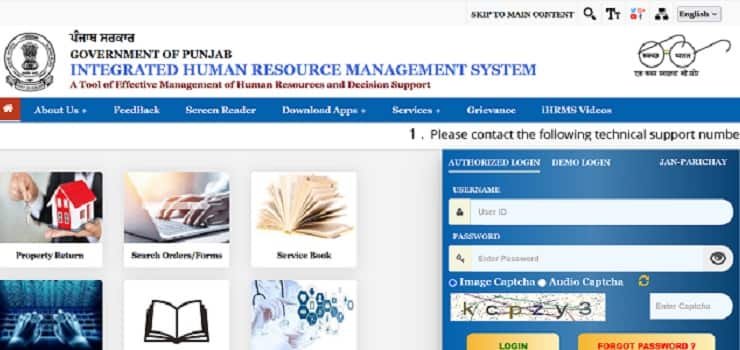
HRMS Punjab Login Process
Employees can begin through the official page: https://hrms.punjab.gov.in/Home/iHRMSPunjab
From the official website, open the Home section to reach the authorised login screen. The login page generally requires:
- Username or iHRMS employee code
- Password
- Captcha verification
The homepage also provides options such as Get iHRMS Code, Raise Query and password recovery. Employees should enter their credentials only on the official Government of Punjab website.
How to Log In to iHRMS Punjab
- Open the official iHRMS Punjab website.
- Select the authorised employee login option.
- Enter your username or iHRMS employee code.
- Type the correct password.
- Enter the image or audio captcha.
- Click the login button.
- The employee dashboard will open after successful verification.
The portal monitors the user’s IP address for security purposes. Employees should avoid logging in through unknown public computers or unofficial websites.
How to Recover the iHRMS Employee Code
Employees who do not remember their employee code can use the Get iHRMS Code facility.
- Open the employee-code recovery page.
- Select Punjab as the state.
- Enter the date of birth.
- Enter the mobile number registered with the establishment office.
- Complete the captcha.
- Select Fetch Employee Code.
The employee code is sent to the registered mobile number after successful verification. When the mobile number recorded in HRMS is old or incorrect, the employee must contact the establishment office for correction.
How to Reset a Forgotten Password
The portal provides a Forgot Password option for employees who cannot access their accounts.
The employee must enter the login ID, captcha and requested identity information. Verification may include the employee’s UID number, date of birth and registered mobile number. A security code is then sent to the registered mobile number.
After verifying the code, the employee can create and confirm a new password.
Key Features of HRMS Punjab
1. Employee Service Book
Employees can view their digital Service Book through iHRMS Punjab. It contains important information such as appointment details, service history, promotions, postings, training, increments and other official transactions.
The system can automatically update the Service Book when transactions relating to leave, increments and training are completed through connected HRMS modules.
2. Salary Slip
Employees with valid login credentials can view their monthly salary slips through the My Services section. A salary slip normally includes basic pay, allowances, deductions and net salary.
The portal also provides annual salary statements containing current and projected salary information. These records can be useful for income-tax filing, loan applications and salary verification.
How to Download a Salary Slip
- Log in to the iHRMS Punjab employee account.
- Open My Services.
- Select the salary or salary-slip option.
- Choose the required month and financial year.
- Open the available salary statement.
- Download or print the document.
Employees should report an incorrect allowance, deduction or salary amount to their Drawing and Disbursing Officer or accounts section.
3. GPF and GIS Statements
The portal provides General Provident Fund and Group Insurance Scheme statements to eligible employees.
Employees may view GPF account information, apply for permitted withdrawals and check the status of their applications. They may also request an increase or decrease in their GPF subscription within the limits allowed by the system.
4. Leave Management
Employees can apply for leave online and track the status of their applications. The system also displays the available leave balance and information about reporting or approving officers.
The leave module reduces the need to submit and move physical applications between different office sections.
5. Income-Tax Information
Employees can view tax deductions and use the available tax-planning facilities. The portal provides both current and projected annual salary information.
Eligible employees can also request an increase or decrease in advance income-tax deductions according to applicable rules.
6. Annual Property Return
The Annual Property Return module allows employees to submit details of movable, immovable and financial assets online.
Employees may also submit a nil return or copy eligible details from an earlier property return. OTP authentication is used during the submission process.
7. APAR
iHRMS Punjab includes facilities related to the Annual Performance Appraisal Report. Employees and authorised reporting or reviewing officers can complete the applicable appraisal activities through the system.
The exact options visible depend on the employee’s designation and assigned role.
8. Pension and ePPO
The portal supports pension-management services and provides a public facility to download an electronic Pension Payment Order.
Retired employees or pensioners can use the available ePPO service according to the verification requirements displayed on the portal.
9. Medical Bill Status
The official homepage provides a Medical Bill Status service. Employees can use it to check available information relating to submitted medical reimbursement bills.
The employee should contact the concerned department when the displayed status remains unchanged for an unusually long period.
10. Orders and Forms
Employees and other users can search for official orders and forms through the portal. This helps them find available departmental instructions without searching through several separate websites.
iHRMS Punjab Mobile Application
The iHRMS Punjab mobile application provides access to several employee services. Employees can view Service Book details, salary slips, income-tax deductions, annual salary statements, GPF and GIS information, leave records, loans and advances.
The application also supports requests for updating contact information such as mobile number, email address and residential address. Such changes are sent to the concerned authority for verification. Access is protected through employee credentials and a PIN.
Benefits of HRMS Punjab
iHRMS Punjab provides a single login for different HR and payroll services. It reduces paperwork, improves transparency and gives employees direct access to important records.
The workflow-based system also helps departments process approvals, maintain updated Service Books and produce administrative and financial reports. SMS and system notifications inform employees about activities pending at their end.
Technical Support
The official portal displays the following support numbers for working days:
0172-2663812, 0172-2663813, 0172-2663814 and 0172-2660126
Technical support is available from 9:00 AM to 5:00 PM on working days. Employees can also submit a query through My Services → Submit Query with Technical Support after logging in.
Troubleshooting Common Problems
1. Employee Code Not Received
Confirm that the date of birth and registered mobile number are correct. Contact the establishment office when the mobile number needs to be updated.
2. OTP Not Received
Wait for a few minutes and check the mobile network. Repeated OTP requests should be avoided.
3. Salary Slip Not Available
The salary process for the selected month may be incomplete. Contact the DDO or accounts section when the record does not appear after payroll processing.
4. Incorrect Service Book Information
Report the incorrect entry to the office maintaining the Service Book and provide the required supporting documents.
5. Portal Not Opening
Enable JavaScript, clear the browser cache and use an updated browser. The official site recommends accessing its services through a compatible modern browser.
Conclusion
HRMS Punjab is a comprehensive employee-management platform for Punjab government departments and participating organisations. It provides access to salary slips, Service Books, GPF, GIS, leave, tax information, property returns, pension services and medical bill status.
Employees should use the official iHRMS Punjab page at https://hrms.punjab.gov.in/Home/iHRMSPunjab and keep their registered mobile number and service details updated.
Frequently Asked Questions
Q1. What is the official HRMS Punjab website?
A: The official iHRMS Punjab page is https://hrms.punjab.gov.in/Home/iHRMSPunjab.
Q2. Can employees download salary slips from iHRMS Punjab?
A: Yes. Registered employees can view and download salary slips through the My Services section.
Q3. How can an employee recover the iHRMS code?
A: Use the Get iHRMS Code option and enter the date of birth, registered mobile number and captcha.
Q4. Can employees apply for leave online?
A: Yes. Employees can apply for leave, view their leave balance and track the approval status through the portal or mobile application.
Q5. What should an employee do when the registered mobile number is incorrect?
A: The employee should contact the establishment office maintaining the HRMS record and request correction of the mobile number.