 By Santosh Kumar
 HRMS Railway stands for Human Resource Management System of Indian Railways. It works as a single-window communication platform between railway employees and the administration. The system maintains employment information from the date an employee joins Indian Railways. Depending on the employee’s profile and permissions, the portal may show personal details, service records, increments, promotions, transfers, postings, leave, training, family information, awards and retirement-benefit nominations. HRMS is available through both a web portal and an employee mobile application. The platform has been developed by CRIS as part of the computerisation of human-resource functions across Indian Railways.
HRMS Railway Login Process
Railway employees can access the official portal through: https://hrms.indianrail.gov.in/HRMS/ The main login page requires:
- Username or HRMS login ID
- Password
- Captcha verification
Employees should use only the official Indian Railways HRMS portal. The login page specifically warns users to beware of fake HRMS websites. 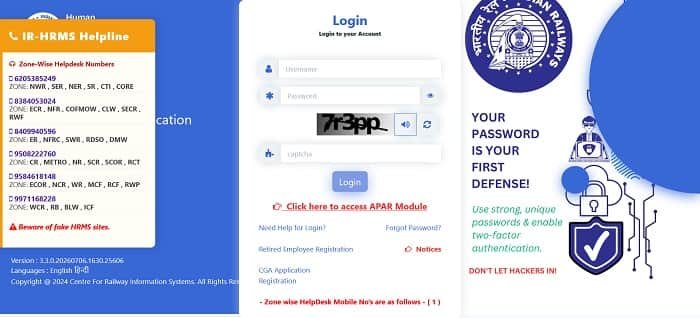
How to Log In to HRMS Railway
Follow these steps to access the employee account:
- Open https://hrms.indianrail.gov.in/HRMS/.
- Enter your HRMS username.
- Type the correct password.
- Read the captcha displayed on the page.
- Enter the captcha in the provided field.
- Click the Login button.
- The employee dashboard will open after successful verification.
An audio option is available beside the captcha for users who find the displayed characters difficult to read. A refresh button can also be used to generate a new captcha.
How to Find Your HRMS Login ID
Employees who need assistance identifying their HRMS login details can select Need Help for Login? on the portal. Enter any one of the requested details, such as:
- IPAS ID
- HRMS ID
- Registered mobile number
After verification, the system may display information such as the HRMS login ID, IPAS employee ID, employee name, department, designation, railway unit, mobile number and email address.
First-Time Registration on the HRMS Mobile App
The HRMS employee mobile application allows railway employees to register using their IPAS number or PF number. During registration:
- Enter the IPAS or PF number.
- An OTP is sent to the mobile number recorded in the employee database.
- Enter the OTP to complete registration.
- The employee can then obtain the HRMS login ID and access the available services.
When the mobile number is missing or incorrect, the employee should contact the establishment clerk for correction.
Key Features of HRMS Railway
1. Employee Master
The Employee Master module contains essential information about railway employees. It may include basic details, family information, communication details, qualifications, medical information and current employment status. Information entered in the module is checked by the designated verifying and accepting authorities before it becomes part of the official HRMS record.
2. Electronic Service Record
The e-SR module digitises the Service Record of an employee. It can include:
- Initial appointment details
- Promotions and transfers
- Pay-change history
- Training information
- Leave records
- Awards and punishments
- Deputation details
- Retirement-benefit nominations
Employees should check their electronic service details carefully and report missing or incorrect entries to the establishment section.
3. e-Pass and PTO
The e-Pass/PTO module allows serving railway employees to apply online for railway passes and Privilege Ticket Orders. A generated e-Pass or PTO may be used for booking eligible tickets at PRS or UTS counters and through supported online railway ticket-booking services. The application and pass-generation process is designed for both desktop and mobile access.
4. Office Orders
The e-Office Order module records important career events such as appointment, promotion, transfer, posting, leave, joining, relieving and superannuation. Once an order is processed, the relevant information can be updated in HRMS and connected systems. Employees may receive information about an office order through SMS or their HRMS dashboard.
5. APAR Module
The portal provides a separate link to the APAR module. APAR means Annual Performance Appraisal Report. The e-APAR module supports the preparation, reporting, review and acceptance of performance-appraisal records. After completion, the concerned employee can view the accepted APAR through the HRMS account, subject to applicable rules and permissions.
6. Provident Fund Advance
The PF Loan and Advance module allows eligible employees to check available provident-fund information and apply online for a PF advance. Employees can also follow the status of their applications through the system. Approval and payment remain subject to the applicable railway and provident-fund rules.
7. Employee Self Service
The Employee Self Service module allows railway employees to interact with different HRMS services from one dashboard. Employees may use it to view their details, request correction of personal or service information and access available transfer-related services. Corrections are processed only after verification by the authorised railway officials.
8. Leave Management
The leave module supports online applications for different categories of leave, including Leave on Average Pay, Leave on Half Average Pay and Child Care Leave, subject to employee eligibility. The application is processed by the concerned reporting and sanctioning authorities through the HRMS workflow.
9. Grievance Module
Railway employees can register eligible service-related grievances through HRMS and check their application status online. Employees should provide accurate information and supporting documents so that the concerned office can examine the grievance properly.
10. Transfer Module
The transfer module supports online submission and processing of different transfer cases. These may include administrative transfers, inter-divisional transfers and inter-railway transfer applications. The availability of a particular transfer option depends on the employee’s category, department and applicable railway rules.
Retired Railway Employee Registration
The HRMS login page provides a separate Retired Employee Registration facility. A retired employee generally needs to:
- Open the registration option.
- Enter the PPO number.
- Provide the date of birth and requested personal information.
- Verify the displayed employee details.
- Enter an active 10-digit mobile number.
- Complete registration through OTP verification.
Registered retired employees may use the available HRMS services, including eligible post-retirement pass facilities.
CGA Application Registration
The HRMS Railway homepage also provides a CGA Application Registration option. CGA refers to Compassionate Ground Appointment. Eligible applicants can use the facility for registration and processing of compassionate-appointment cases. The application remains subject to verification, required documents, eligibility conditions and the applicable Indian Railways rules.
How to Reset the HRMS Railway Password
Employees who forget their password can use the Forgot Password option. The portal asks for:
- HRMS ID
- Date of birth
- Registered mobile number
An OTP is sent to the registered mobile number. After verification, the employee can set a new password. The password must contain 8 to 15 characters, including an uppercase letter, lowercase letter, number and permitted special character. The previous two passwords cannot be reused.
HRMS Railway Helpdesk Numbers
The portal provides different helpdesk numbers for railway zones and units:
- 6205385249: NWR, SER, NER, SR, CTI and CORE
- 8384053024: ECR, NFR, COFMOW, CLW, SECR and RWF
- 8409940596: ER, NFRC, SWR, RDSO and DMW
- 9508222760: CR, Metro, NR, SCR, SCOR and RCT
- 9584618148: ECoR, NCR, WR, MCF, RCF and RWP
- 9971168228: WCR, Railway Board, BLW and ICF
Employees may also raise a service request when the issue cannot be resolved through the available login-help options.
Benefits of HRMS Railway
HRMS Railway reduces dependence on physical employee files and gives workers easier access to service-related information. It improves transparency by allowing employees to check records, applications and orders from their accounts. Digital processing of passes, leave, PF advances, transfers, grievances and retirement cases can also reduce delays between employees and administrative offices.
Conclusion
HRMS Railway is a central digital platform for serving and retired Indian Railways employees. It brings employee records, e-Pass/PTO, APAR, leave, provident-fund advances, transfers, grievances and settlement services together in one system. Employees should use only https://hrms.indianrail.gov.in/HRMS/ and keep their registered mobile number and service information updated. They should also avoid sharing their HRMS password, OTP or personal records with unauthorised persons.
Frequently Asked Questions
Q1. What is the official HRMS Railway portal?
A: The official portal is https://hrms.indianrail.gov.in/HRMS/.
Q2. Who can use HRMS Railway?
A: Serving railway employees, authorised railway officials and registered retired employees can use the services available for their respective profiles.
Q3. Can railway employees apply for e-Pass through HRMS?
A: Yes. Eligible employees can apply for e-Pass and PTO through the relevant HRMS module.
Q4. How can a retired railway employee register?
A: The retired employee can use the registration option on the login page and verify the account using the PPO number, date of birth and OTP.
Q5. What should I do if I forget my HRMS password?
A: Select Forgot Password, enter the HRMS ID, date of birth and registered mobile number, and complete the OTP verification process.