 By Santosh Kumar
 HRMS Haryana stands for Human Resource Management System Haryana. It is an official platform designed to digitise and automate human-resource functions across government departments.
The system supports employee-data management, digital service records, policy-based transfers and performance information. It is also integrated with the e-Salary module of the Integrated Financial Management System and the state’s e-Post Sanctioning System.
HRMS Haryana maintains both historical and future service transactions. Historical transactions may include earlier promotions, loans, GPF entries, disciplinary matters, leave balances and service verification. Future transactions record new personnel actions as they take place.
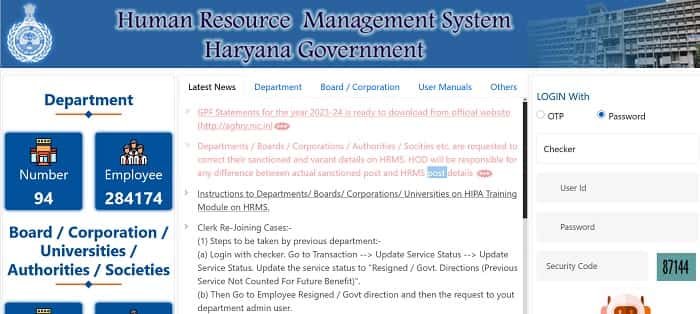
HRMS Haryana Portal Login Process
Authorised users can access the portal through: https://hrmshry.nic.in/
The HRMS Haryana homepage provides two login methods:
- Login through OTP
- Login through password
The portal supports several official user roles, including maker, checker, department admin, department nodal user, data-correction user, report administrator and super administrator. The dashboard and available services depend on the role assigned to the account.
How to Log In Using OTP
Follow these steps to use OTP login:
- Open https://hrmshry.nic.in/.
- Select the OTP login option.
- Choose the appropriate user level.
- Enter the 10-digit mobile number registered with HRMS.
- Request the OTP.
- Enter the OTP received on the registered mobile number.
- Complete the verification to open the dashboard.
The OTP facility will work only when the correct mobile number is available in the HRMS records.
How to Log In Using a Password
- Visit the official HRMS Haryana portal.
- Select the Password option.
- Choose the applicable user role.
- Enter the HRMS User ID.
- Type the correct password.
- Complete any security verification displayed.
- Click the login button.
A Forgot Password option is available on the login page. Users who cannot reset their credentials online should contact their departmental HRMS administrator or nodal officer.
HRMS Haryana Employee Registration
The main HRMS portal is largely meant for departmental processing. Government employees can use the linked Karamchari Sahayak portal at Intra Haryana for registration and employee self-service.
A new employee must select the registration option and provide details such as employee type, payee code, unique code or salary bank account number. The system then retrieves the mobile number recorded in HRMS or e-Salary and sends an OTP for verification.
After OTP verification, the employee can create a password. The payee code, unique code or registered mobile number can then be used as the User ID. When the displayed mobile number is incorrect, the employee must approach the DDO for an update before completing registration.
Key Features of HRMS Haryana
1. Digital Service Book
HRMS Haryana maintains an employee’s service history in digital form. The Service Book may contain appointment, leave, promotion, financial upgradation, training, awards and loan-related information.
Employees can view the complete Digital Service Book through the Karamchari Sahayak portal, while authorised officials update and verify transactions through HRMS.
2. Employee Data Management
The platform maintains important personal and official information for registered employees. Departments can update employment status, office information, service history and other authorised records.
HRMS instructions also cover employee data belonging to boards, corporations and contractual staff where applicable.
3. Transfer and Posting Management
HRMS Haryana supports policy-based transfer processes. Employees may be able to view or verify their policy score and submit station preferences through the connected employee portal.
Official transfer, joining and relieving transactions can be recorded digitally so that the service history remains updated.
4. Leave and Tour Management
Employees can apply for different types of leave and official tours through Karamchari Sahayak. They can also view their leave balance and follow the status of submitted applications.
The online workflow sends the request to the concerned reporting and approving officials, reducing the movement of physical forms between offices.
5. Online ACR and Performance Records
HRMS Haryana supports a workflow-based Annual Confidential Report system. Eligible employees and authorised reporting, reviewing and accepting officers can complete their part of the process online.
Users can submit ACR details, download available records and track the progress of the report. The platform also supports Monthly Progress Reports for evaluating the performance of subordinate employees.
6. Annual Property Return
Eligible employees can submit their Annual Property Return through the linked employee portal. The system allows users to view earlier returns, download submitted details and check records according to the relevant financial year.
Employees should submit complete and accurate property information within the timelines prescribed by the government.
7. Promotion and Financial Upgradation
Authorised officials can record promotions, Assured Career Progression benefits and time-scale or financial-upgradation orders through HRMS.
These transactions become part of the employee’s digital service history after the required approval and verification.
8. Family and PPP Details
HRMS Haryana supports the mapping and updating of family information with Parivar Pehchan Patra details. Employees should check that their family records are correct and report any mismatch through the proper departmental process.
9. Grievance Support
Users facing HRMS-related problems can submit grievances through the Haryana Help Desk linked on the official portal. HRMS credentials may be required to access the support system.
Benefits of HRMS Haryana
1. Centralised Employee Records
HRMS keeps service transactions and employee information within one connected system.
2. Reduced Paperwork
Online leave, transfer, ACR, property-return and service-record processes reduce dependence on physical files.
3. Better Transparency
Employees can view available records and follow the status of applications through the connected employee portal.
4. Improved Data Accuracy
Maker-checker and departmental approval workflows help ensure that official changes are properly reviewed before being added to the record.
5. Faster Administrative Processing
Departments can process transfers, promotions, service-status changes and other personnel matters through defined online workflows.
Troubleshooting Common Problems
1. OTP Not Received
Check whether the mobile number registered in HRMS is active and correct. Contact the DDO or departmental nodal official when it needs to be updated.
2. Forgot Password
Use the Forgot Password option on the login page. Complete the identity and OTP verification requested by the portal.
3. Portal Not Opening Properly
The official login page advises users to clear cookies, cached website data and autofill information. The portal can be accessed through updated versions of Google Chrome, Mozilla Firefox or Microsoft Edge.
4. Incorrect Service Information
Report the incorrect entry to the DDO, establishment branch or authorised HRMS official with the required supporting records.
Conclusion
HRMS Haryana is an important employee-management platform used by the Government of Haryana. It supports digital Service Books, employee-data management, transfers, leave, ACRs, property returns, promotions and other personnel transactions.
Authorised officials should use only https://hrmshry.nic.in/. Employees looking for self-service facilities can use the Karamchari Sahayak link available on the official HRMS portal.
Frequently Asked Questions
Q1. What is the official HRMS Haryana website?
A: The official HRMS Haryana website is https://hrmshry.nic.in/.
Q2. Who can log in to HRMS Haryana?
A: Authorised makers, checkers, department administrators, nodal users and other approved officials can log in according to their assigned roles.
Q3. Does HRMS Haryana provide OTP login?
A: Yes. The portal supports both OTP and password-based login.
Q4. Where can Haryana government employees register?
A: Employees can register through the Karamchari Sahayak portal linked on the official HRMS Haryana homepage.
Q5. What should users do when HRMS is not opening?
A: They should clear the browser cache and cookies and try again using an updated version of Chrome, Firefox or Microsoft Edge.