 By Santosh Kumar
 HRMS Bihar stands for Human Resource Management System Bihar. It is an official digital employee-management platform developed for government employees in the state.
The system helps departments maintain employee information in an organised electronic form. It connects important services such as employee profiles, Service Books, salary slips, annual income information, leave-related updates, LTC requests and personal information correction.
The HRMS Bihar system is managed under the guidance of the Government of Bihar. The official HRMS Bihar mobile application is published by the Bihar Prashasnik Sudhar Mission Society.
HRMS Bihar Portal Login Process
Bihar government employees can access the portal through: https://hrms.bihar.gov.in/
The login page provides two separate methods:
- By Password
- By OTP
Employees should use only the official website and should never share their username, password or OTP with another person.
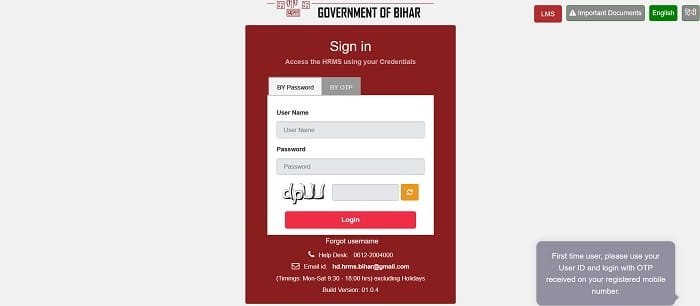
How to Log In Using a Password
Follow these steps to access HRMS Bihar through your password:
- Open https://hrms.bihar.gov.in/.
- Select the By Password tab.
- Enter your HRMS username.
- Type your password.
- Enter the captcha displayed on the screen.
- Click the Login button.
- The HRMS employee dashboard will open after successful verification.
The captcha is case-sensitive in some situations. Employees should enter the characters carefully. A refresh button is available beside the captcha when the displayed characters are difficult to read.
HRMS Bihar Login Using OTP
Employees who prefer OTP authentication can use the second login method.
- Visit https://hrms.bihar.gov.in/.
- Select the By OTP tab.
- Enter your registered username.
- Click the option to send the OTP.
- Enter the OTP received on the registered mobile number.
- Complete the verification to access the account.
OTP login works only when the employee’s active mobile number is correctly recorded in the HRMS database. Employees who have changed their mobile number should contact their establishment section or departmental HRMS official.
How to Recover a Forgotten Username
The HRMS Bihar login page provides a Forgot username option below the login section.
Employees who do not remember their username can select this option and complete the requested verification process. The system may require information connected with the employee’s registered HRMS profile.
When the username cannot be recovered online, the employee should contact the departmental establishment section, HRMS operator or official help desk.
HRMS Bihar Help-Desk Details
Employees facing login or technical problems can contact the HRMS Bihar help desk.
Help-desk number: 0612-2004000
Email: hd.hrms.bihar@gmail.com
Working hours: Monday to Saturday, 9:30 AM to 6:00 PM, excluding holidays
These contact details are displayed on the official HRMS Bihar login page.
First-Time HRMS Bihar Users
HRMS Bihar does not provide open public registration. Employee accounts are created or mapped through the concerned government department.
A new employee should obtain the username and other account details from the establishment section, Drawing and Disbursing Officer, departmental HRMS operator or authorised office official.
The employee should also make sure that the following information is correctly recorded:
- Name and employee details
- Department and office
- Mobile number
- Email address
- Date of joining
- Designation
- Family and nominee details
Incorrect information can affect OTP delivery, salary records and access to employee services.
Key Features of HRMS Bihar
1. Employee Profile
HRMS Bihar maintains an electronic profile containing the employee’s personal and official information. Employees can view the details available in their accounts and identify missing or incorrect entries.
Requests may be submitted for changes to selected non-service-related information such as the mobile number, email address, current address and family or nominee details.
2. e-Service Book
The e-Service Book contains important details connected with an employee’s government service. It may include appointment information, service history, postings and other official entries.
Employees can view their electronic Service Book through the HRMS system. When an entry differs from the physical Service Book, the employee may request correction through the prescribed departmental process.
3. Salary Slip
Registered employees can access monthly salary slips through HRMS Bihar. A salary slip generally shows earnings, allowances, deductions and the final amount payable.
The facility makes it easier for employees to obtain salary documents without repeatedly visiting the accounts section. Salary slips may also be useful for income verification, bank loans and personal financial records.
4. Annual Income and Deduction Details
HRMS Bihar provides access to annual income information and deduction records. Employees can review the available financial information while preparing income-tax documents or checking salary deductions.
Any incorrect deduction or missing salary entry should be reported to the accounts section or DDO.
5. Leave Services
Employees can use HRMS services for leave-related work and receive updates about the status of leave requests and approvals.
The electronic process reduces the movement of physical applications between employees, reporting officers and approving authorities.
6. Leave Travel Concession
Eligible employees can use HRMS services to apply for Leave Travel Concession benefits. The official system supports LTC applications, uploading claims and supporting documents, and checking approval or payment updates.
LTC eligibility and reimbursement depend on the rules applicable to the employee and department.
7. Personal Information Change Request
Employees can request changes to selected personal information through HRMS. This may include:
- Registered mobile number
- Email address
- Current residential address
- Family-member details
- Nominee information
Changes affecting service conditions may require separate verification and approval from the competent authority.
8. Notifications and Alerts
The HRMS platform provides notifications connected with leave status, LTC processing, approvals and departmental announcements.
These alerts help employees follow important requests without repeatedly contacting the establishment section.
9. Important Documents and LMS
The official login page includes an Important Documents section where employees can access HRMS-related instructions or documents.
It also displays an LMS option. LMS generally refers to the Learning Management System and may provide access to authorised training or learning resources for employees.
How to Download a Salary Slip from HRMS Bihar
- Open https://hrms.bihar.gov.in/.
- Log in using your password or OTP.
- Open the salary or finance section.
- Select the required financial year.
- Choose the month for which the salary slip is needed.
- Open the available salary-slip record.
- Download or print the document.
The exact menu name may differ according to the employee’s role and the version of the dashboard.
Benefits of HRMS Bihar
1. Saves Time
Employees can access available service and salary information without repeatedly visiting different office sections.
2. Reduces Paperwork
Digital records, applications and approvals reduce dependence on physical registers and paper files.
3. Improves Transparency
Employees can review salary slips, Service Book information and the status of supported requests through their accounts.
4. Provides Centralised Records
Important employee information is maintained within one connected HRMS system.
5. Supports Web and Mobile Access
HRMS information is synchronised across supported web and mobile services, helping employees access updated records more conveniently.
Troubleshooting Common Problems
1. Incorrect Username or Password
Check the spelling and letter case carefully. Avoid adding spaces before or after the username. Employees who have forgotten their username can use the Forgot username option.
2. OTP Not Received
Confirm that the mobile number registered in HRMS is active. Network delays may also affect OTP delivery. Do not request several OTPs within a very short time.
3. Captcha Not Clear
Click the refresh icon beside the captcha to generate a new code.
4. Salary Slip Not Showing
The salary record may not appear when payroll processing is incomplete or the employee is not correctly mapped. Contact the accounts section or DDO when the problem continues.
5. Portal Not Opening
Refresh the page, clear the browser cache or use an updated browser. Temporary server maintenance or heavy traffic may also affect portal access.
Conclusion
HRMS Bihar is an important digital platform for Bihar government employees. It provides password and OTP login, access to Service Books, salary slips, annual income records, LTC services, personal information correction and important notifications.
Employees should use only https://hrms.bihar.gov.in/ and keep their registered mobile number and service information updated. For technical assistance, they can contact the official HRMS help desk during the displayed working hours.
Frequently Asked Questions
Q1. What is the official HRMS Bihar portal?
A: The official employee portal is https://hrms.bihar.gov.in/.
Q2. Can employees log in through OTP?
A: Yes. The portal provides both password and OTP login options.
Q3. What should I do if I forget my HRMS username?
A: Select Forgot username on the login page or contact the departmental HRMS official.
Q4. Can employees download salary slips from HRMS Bihar?
A: Yes. Registered employees can access monthly salary slips through the salary or finance section.
Q5. What is the HRMS Bihar help-desk number?
A: The official help-desk number displayed on the portal is 0612-2004000.