 By Santosh Kumar
 HRMS Assam is a Human Resource Management and Information System used mainly for maintaining the records of teachers working under Assam’s school education system.
The website also functions as a Teacher Transfer Management System. It allows registered teachers to submit their profiles, apply for transfers and track the progress of their applications.
The HRMS profile can include personal information, academic and professional qualifications, appointment details, present posting, service history, promotion details and other official records.
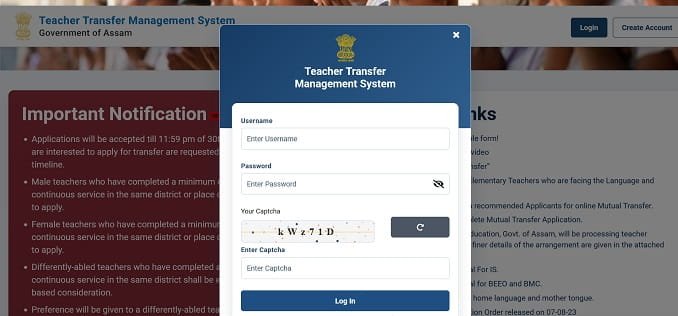
HRMS Assam Portal Login Process
Teachers can access the official portal through: https://hrmsassam.in/
The login section generally requires:
- Registered username
- Password
- Captcha verification
The website states that it is not compatible with mobile devices. Therefore, teachers should preferably use a desktop or laptop with an updated browser.
How to Log In to HRMS Assam
Follow these steps to access the HRMS Assam account:
- Open https://hrmsassam.in/.
- Go to the teacher login section.
- Enter the registered username.
- Type the correct password.
- Enter the captcha shown on the screen.
- Click the login button.
- The teacher dashboard will open after successful verification.
Teachers should use only the official website and avoid sharing their username or password with another person.
HRMS Assam Teacher Registration
Teachers who do not have an account must first complete the registration process.
The general process is:
- Visit the HRMS Assam portal.
- Select the option to create an account.
- Enter the required personal information.
- Provide contact and employment details.
- Create the username and password.
- Sign in using the newly registered credentials.
- Complete the remaining teacher-profile sections.
- Submit the profile for verification and approval.
After providing all the required information, the profile is submitted for departmental examination. A teacher normally becomes eligible to use transfer facilities after the profile is approved.
Information Required in the HRMS Assam Profile
Teachers may be asked to provide information such as:
- Teacher or employee code
- UDISE code of the school
- Name and date of birth
- Aadhaar and PAN details
- Address and mobile number
- Academic qualifications
- Professional qualifications
- Appointment and joining details
- Present designation and school
- Service and promotion history
- GPF, NPS, GIS or related account details
- Previous posting information
Teachers should enter all details carefully because transfer applications are processed using the information available in the approved profile.
Key Features of HRMS Assam
1. Digital Teacher Profile
HRMS Assam provides a central profile for every registered teacher. The profile contains important personal, academic and service-related details.
Teachers should review all entries before submitting the profile. Incorrect information may delay verification or create problems during the transfer process.
2. Profile Verification and Approval
A submitted profile passes through different stages.
Pending means that the profile is under processing. Verified means the information has been checked. Approved means that the profile has completed the required approval process.
Teachers generally need an approved profile before applying for certain transfer services.
3. General Transfer Application
The portal supports online processing of eligible teacher-transfer applications. Teachers can submit their requests through the HRMS dashboard instead of depending only on physical forms.
Applications may be examined at block, district and higher departmental levels. Officials can view the teacher profile, add remarks and forward the application to the next level.
4. Mutual Transfer
Mutual transfer allows two eligible teachers to exchange their places of posting.
Teachers applying for mutual transfer generally need to belong to matching categories. Requirements may include the same cadre, school category, teacher category, designation, medium, subject or language, depending on the applicable rules.
A teacher can search for another applicant using details such as Aadhaar number, employee code, PAN number or preferred district. Both teachers must complete the required acceptance steps before a mutual-transfer application ID is generated.
5. Transfer Status Tracking
Teachers can follow the progress of their transfer applications through the Transfer Status section.
The portal may display whether the application is pending, forwarded, approved or processed for order generation. This reduces the need to visit different offices only to ask about application status.
6. Requested by Me and Requested by Others
The mutual-transfer section provides separate options for applications initiated by the teacher and requests received from another teacher.
The Requested by Me section displays requests created by the logged-in teacher. The Requested by Others section shows mutual-transfer requests received from another applicant.
7. Application Withdrawal
A mutual-transfer request may be withdrawn according to the applicable procedure and stage of processing.
For certain withdrawal requests, both teachers may need to confirm their willingness and provide the application ID and supporting request. Withdrawal conditions can differ depending on whether the application has already reached the first approval level.
8. Administrative Verification
The system provides separate access for authorised block-level, district-level and Inspector of Schools officials.
These users can examine applications, view teacher profiles, enter remarks, provide school information and forward eligible cases to the next authority. Forwarded and order-generated applications can also be viewed through the appropriate dashboard sections.
9. Transfer Order Records
Authorised officials can process applications for order generation after completing the required verification.
The system can maintain pending applications, generated orders, order history and forwarded cases. This provides a digital record of different stages of the transfer process.
Benefits of HRMS Assam
1. Centralised Teacher Information
Personal, academic, professional and service details are stored within one connected profile.
2. Online Transfer Applications
Eligible teachers can apply for general or mutual transfers through the internet.
3. Better Transparency
Teachers can check profile and transfer status without repeatedly contacting administrative offices.
4. Reduced Paperwork
Digital registration, profile submission and application forwarding reduce dependence on physical files.
5. Structured Verification
Applications move through defined block, district and departmental levels, with remarks and action history recorded in the system.
Troubleshooting Common Problems
1. Website Not Opening on Mobile
The portal indicates that it is not compatible with mobile devices. Use a desktop or laptop and an updated browser.
2. Username or Password Not Working
Check the spelling, letter case and unwanted spaces. Use the registered credentials created during account registration.
3. Profile Still Showing Pending
A pending status means that the profile is still under processing. Wait for verification or contact the concerned education office when the status remains unchanged for a long time.
4. Mutual Transfer Option Not Visible
The option may not appear when the teacher’s profile has not been approved or the teacher does not meet the applicable transfer conditions.
5. Incorrect Profile Information
Teachers should contact the concerned verifying authority or education office and provide supporting documents for correction.
Conclusion
HRMS Assam is an important digital platform for teacher-profile and transfer management under the state’s school education system. It allows teachers to create profiles, complete verification, submit transfer requests and check application status online.
Teachers should use only https://hrmsassam.in/ and ensure that all personal, qualification and service details are correct before submitting their profiles or transfer applications.
Frequently Asked Questions
Q1. What is the official HRMS Assam portal?
A: The official portal is https://hrmsassam.in/.
Q2. Who can use HRMS Assam?
A: Teachers and authorised school education officials with valid registered accounts can use the portal.
Q3. Can a teacher apply for mutual transfer through HRMS Assam?
A: Yes. Eligible teachers with approved profiles can apply for mutual transfer according to the applicable matching conditions.
Q4. What does a pending profile status mean?
A: It means that the teacher’s profile is still under processing and has not completed verification and approval.
Q5. Can HRMS Assam be used on a mobile phone?
A: The official website states that it is not compatible with mobile devices. A desktop or laptop is recommended.