 By Santosh Kumar
 DVET HRMS is the Human Resource Management System of the Directorate of Vocational Education and Training, Maharashtra State. It is designed to maintain employee information and manage important departmental HR processes online.
The platform supports employee-profile verification, attendance management, leave applications, performance appraisals, transfer preferences, training information, retirement processing and departmental enquiry records. The services visible to each person may differ according to the employee’s designation and assigned role.
DVET HRMS Portal Login Process
Employees can access the portal through: hrms.dvet.gov.in/login
The login page requires:
- Username
- Password
A Forgot your password? option is available below the login form. Employees should use only the official DVET website and avoid sharing their login credentials with another person.
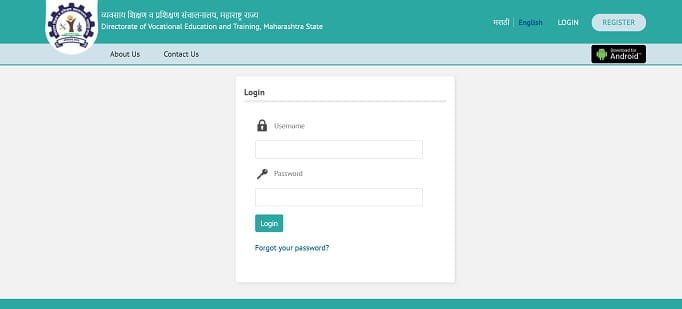
How to Log In to DVET HRMS
Follow these steps to access the employee account:
- Open hrms.dvet.gov.in/login.
- Enter the registered username.
- Type the correct password.
- Click the Login button.
- Wait for the employee dashboard to open.
- Select the required HRMS service from the menu.
Username and password details may be sent to the employee’s registered email address or mobile number after successful registration.
DVET HRMS Employee Registration
Employees who have not previously registered can use the Register option available on the portal.
The general registration process is:
- Open the DVET HRMS website.
- Click Register.
- Enter the required employee and contact information.
- Provide the primary mobile number.
- Click Send OTP.
- Enter the OTP received on the mobile number.
- Check all mandatory information carefully.
- Submit the registration form.
After successful registration, the employee receives login information through the entered email address and mobile number.
Private-institute employees may be required to create or enter the Sevaarth ID in the format prescribed on the official employee-registration page. The form asks for the Sevaarth ID, mobile number, email address and password.
Key Features of DVET HRMS
1. Employee Profile
The employee-profile section maintains important personal and service-related information. Employees can enter or check details such as:
- Personal information
- Permanent and correspondence addresses
- Family and nominee details
- Category information
- Academic qualifications
- Previous work experience
- Present posting
- Posting history
- Training details
- Bank and PF or DCPS information
A passport-size photograph and supporting certificates may also be required in the relevant sections.
2. Profile Verification
After completing all mandatory sections, the employee can send the profile to the authorised approver for verification.
The approver can examine details related to category, qualifications, present posting and previous posting history. The dashboard uses different colours to indicate whether information is incomplete, submitted or verified. Employees should check every entry carefully before sending the profile for approval.
3. Attendance Management
DVET HRMS maintains monthly employee attendance information. Employees can view attendance in monthly, weekly or daily formats.
The attendance record may show punch-in and punch-out times, working hours, location and other available information. Employees may also receive an option to add attendance when permitted, while authorised approvers can process, approve or reject attendance entries.
4. Leave Management
Employees can submit leave applications through the HRMS platform instead of depending entirely on physical forms.
The system helps employees complete a leave request and allows the concerned officer to examine and process it through the online workflow. Availability of particular leave types depends on the employee’s eligibility and departmental rules.
5. Performance Appraisal
DVET HRMS includes a performance-appraisal module. Employees can provide the details of their reporting and reviewing officers and complete the applicable appraisal activities online.
The system can record more than one reporting or reviewing officer when an employee worked under different authorities during the appraisal period. It also provides an option to identify the establishment approver.
6. Transfer Preferences
The employee profile includes a section for submitting transfer preferences according to the applicable government resolution.
Employees may need to provide preferred locations and upload supporting certificates wherever required. Entering a preference does not by itself guarantee a transfer, as the final decision depends on departmental rules, vacancies and approval.
7. Training Records
Employees can maintain information about training programmes they have attended. Training certificates may also be uploaded where applicable.
The wider HRMS module provides facilities for viewing training lists, recording rejoining after training and checking an employee’s training profile.
8. Retirement Management
The retirement module helps authorised officials prepare and monitor retirement-related employee lists.
It includes options connected with retirement cases, appeals, cancelled cases, reports and an employee’s own retirement information. The exact facilities available depend on the user’s role and access permissions.
9. Discipline and Departmental Enquiry
DVET HRMS includes facilities related to disciplinary and departmental enquiry cases.
Authorised users may register complaints, view cases, check disciplinary appeals and follow the available case status. Such records are confidential and can be accessed only by eligible officials and employees.
10. Marathi and English Access
The portal allows users to switch between Marathi and English. This makes the system easier to use for employees across different DVET offices and institutes in Maharashtra.
Benefits of DVET HRMS
1. Centralised Employee Information
Personal details, qualifications, family information, postings, attendance and other records are maintained within one connected system.
2. Reduced Paperwork
Online registration, attendance, leave, profile verification and appraisal processes reduce dependence on physical forms and files.
3. Better Transparency
Employees can check the information recorded in their profiles and follow the verification status of submitted details.
4. Faster Administrative Work
Approvers can examine employee profiles, attendance and other requests through defined digital workflows.
5. Improved Record Accuracy
The verification process allows authorised officials to check important information before accepting it as part of the employee record.
DVET HRMS Support Details
Employees facing portal or login problems can use the official support details displayed on the login page:
Helpline: 1800-120-1696
Email: hrms@dvet.edu.in
Employees should provide their name, username or Sevaarth ID, institute or office details and a clear explanation of the problem while seeking assistance.
Troubleshooting Common Problems
1. Username or Password Not Working
Check the spelling and letter case carefully. Make sure that no unwanted spaces have been entered before or after the username.
2. Forgot Password
Select Forgot your password? on the login page and complete the verification process shown by the portal. Contact the HRMS support team when online recovery is unsuccessful.
3. OTP Not Received During Registration
Confirm that the mobile number is correct and active. Wait for a few minutes before requesting another OTP.
4. Profile Verification Pending
A profile remains pending until the authorised approver checks the required sections. Contact the concerned institute or establishment office when the request remains pending for an unusually long period.
5. Incorrect Employee Details
Correct editable information before sending the profile for verification. For verified or locked details, contact the authorised approver with supporting documents.
Conclusion
DVET HRMS is an important employee-management platform for the Directorate of Vocational Education and Training, Maharashtra. It supports employee registration, profile verification, attendance, leave, appraisals, transfer preferences, training and retirement-related processes.
Employees should use only hrms.dvet.gov.in/login, keep their registered mobile number and email address updated, and ensure that all profile information is correct before submitting it for verification.
Frequently Asked Questions
Q1. What is the official DVET HRMS login portal?
A: The official login portal is hrms.dvet.gov.in/login.
Q2. Who can use DVET HRMS?
A: DVET Maharashtra employees and other authorised users with valid login credentials can use the services assigned to their accounts.
Q3. Can a new employee register online?
A: Yes. The portal provides a registration option through which eligible users can enter their details and verify their mobile number using an OTP.
Q4. Can employees submit transfer preferences through DVET HRMS?
A: Yes. The employee-profile section includes a facility for entering transfer preferences according to the applicable government rules.
Q5. What is the DVET HRMS helpline number?
A: The official helpline number displayed on the portal is 1800-120-1696.