 By Santosh Kumar
 MSSC HRMS is the Human Resource Management System of the Maharashtra State Security Corporation. It is designed to help the organisation maintain employee-related information and complete authorised administrative work through a central digital system.
The Maharashtra State Security Corporation was established under the Maharashtra State Security Corporation Act, 2010. It forms and manages a specialised security force that protects government offices, public and private institutions, vital installations and important infrastructure across Maharashtra.
The HRMS portal is separate from the main public website of MSSC. The public corporate website provides information about the organisation, recruitment, services and notifications, while https://mssc.co.in is the restricted HRMS login page.
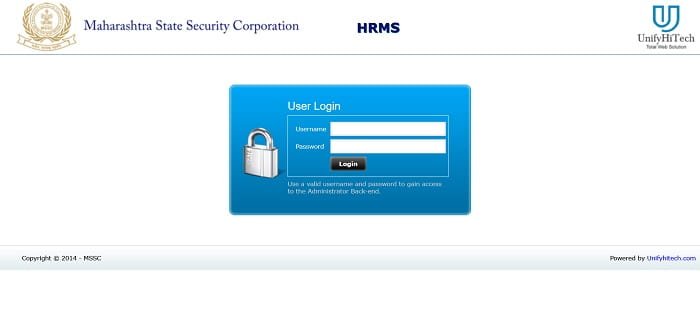
MSSC HRMS Portal Login Process
Authorised users can access the portal through: https://mssc.co.in/
The login page requires:
- Username
- Password
The page does not display public registration, OTP login or a password-recovery facility. Users must therefore obtain their credentials and login assistance through the concerned MSSC administrative or HR office.
How to Log In to MSSC HRMS
Follow these steps to access the MSSC HRMS account:
- Open https://mssc.co.in/ in an updated browser.
- Enter the username assigned by MSSC.
- Type the correct password.
- Click the Login button.
- Wait for the administrator dashboard to open.
- Select the required service from the available internal menu.
The login page states that a valid username and password are necessary to access the administrator back-end. The services displayed after login may depend on the user’s role and permissions.
Users should avoid opening HRMS on a public or shared computer. They should also sign out properly after completing their work.
First-Time MSSC HRMS Users
The MSSC HRMS page does not provide an open account-registration option. A newly appointed employee or authorised administrator should contact the concerned HR, establishment or administrative office to confirm whether an HRMS account has been created.
The user may need to obtain:
- Employee or administrative username
- Temporary or initial password
- Instructions for changing the password
- Details of the assigned HRMS role
- Contact information for the responsible administrator
Credentials should not be obtained through unofficial websites or unknown individuals. Only the organisation’s authorised office should create or confirm an HRMS account.
Key Features of MSSC HRMS
1. Employee Information Management
MSSC HRMS helps authorised officials maintain employee information in one digital system. The employee profile may contain personal details, employment information, designation, unit, contact details and service-related records.
Centralised information makes it easier for the organisation to manage security personnel and administrative staff working at different locations.
Employees should report incorrect information to their unit or HR section. Official records should be changed only after proper verification.
2. Attendance Tracking
Attendance management is an important HRMS function for security personnel working in shifts and at different deployment locations.
The platform can help authorised users maintain duty attendance and shift information. Accurate attendance records are important because they may affect salary processing, duty calculations and the employee’s monthly records.
Employees who notice missing or incorrect attendance should report the issue promptly to their supervisor or unit office.
3. Salary and Employee Payment Records
The internal HRMS system may provide access to salary-related records according to the employee’s permissions. Available information can include monthly earnings, deductions and payment details.
Salary records help employees check whether attendance, allowances and deductions have been processed correctly. Any difference should be reported to the accounts, payroll or unit office with the relevant supporting information.
4. Leave Management
HRMS can support the electronic management of employee leave. Eligible users may be able to submit leave requests and check their processing status through the internal dashboard.
Online leave processing reduces dependence on paper applications and allows supervisors or authorised officials to examine requests through a defined workflow. The leave types available depend on MSSC rules and the employee’s eligibility.
5. Deployment and Posting Information
MSSC personnel are deployed at government establishments, airports, metro systems, financial institutions, hospitals, expressways, power facilities and other important locations across Maharashtra. The Corporation’s official website states that it provides security cover to hundreds of vital installations and establishments.
HRMS can help maintain an employee’s unit, posting and deployment details. Updated records allow administrators to identify where security personnel are currently assigned.
Employees should contact the unit in-charge when their displayed deployment or posting information is incorrect.
6. Training Records
MSSC follows a structured process for selecting and training security personnel. Its official website states that recruitment, training, deployment, service delivery and discipline are supervised under the Corporation’s command structure.
The HRMS system may maintain information about training programmes, qualifications and certifications connected with employees. This helps the organisation monitor whether personnel have completed the training required for their duties.
7. Administrator Back-End
The public login page specifically describes the system as an administrator back-end. This indicates that the portal is used not only for viewing information but also for authorised administrative processing.
The exact functions depend on the user’s role. Some users may be allowed to add, verify or update employee records, while others may have view-only access.
Benefits of MSSC HRMS
1. Centralised Workforce Records
MSSC HRMS brings important employee and deployment information into one connected system.
2. Reduced Paperwork
Digital records can reduce dependence on physical registers, separate spreadsheets and repeated paper applications.
3. Faster Administrative Processing
Authorised officials can review employee information and complete available HR activities without moving files between multiple offices.
4. Better Transparency
Employees can check the information available in their accounts and report differences in attendance, salary, leave or deployment records.
5. Role-Based Access
The administrator back-end can provide different permissions according to the responsibilities assigned to each user.
Troubleshooting Common Problems
1. Username or Password Not Working
Check the spelling and letter case carefully. Make sure no unwanted spaces have been added before or after the username.
2. Forgot Password Option Not Available
The public login screen does not display a password-recovery link. Contact the HR section, unit in-charge or authorised HRMS administrator for assistance.
3. Account Not Created
HRMS does not provide public self-registration. Newly appointed personnel should contact the concerned MSSC office to obtain credentials.
4. Employee Information Is Incorrect
Report the incorrect entry to the HR or establishment section. Provide supporting documents when a change affects official service information.
5. Portal Not Opening
Refresh the page, clear the browser cache and try again using an updated browser. Temporary maintenance or an internet problem may also prevent access.
Conclusion
MSSC HRMS is an internal employee and administrative management platform of the Maharashtra State Security Corporation. It provides secure username-and-password access to the administrator back-end and helps organise employee, attendance, salary, leave, deployment and training-related information.
Authorised users should access the system only through https://mssc.co.in/. Login credentials should be obtained from the concerned MSSC office and kept confidential.
Frequently Asked Questions
Q1. What is the official MSSC HRMS portal?
A: The official MSSC HRMS portal is https://mssc.co.in/.
Q2. Who can use MSSC HRMS?
A: MSSC employees, administrators and other authorised users with valid credentials can access the platform.
Q3. What details are needed to log in?
A: Users need the username and password assigned to their HRMS account.
Q4. Can a new employee register directly on the portal?
A: No. The public login page does not provide self-registration. Employees must contact the concerned MSSC office.
Q5. What should users do if they forget their password?
A: They should contact the HR section, unit in-charge or authorised HRMS administrator because the public page does not show an online password-reset option.