 By Santosh Kumar
 HRMS Odisha is the official online human resource platform for employees of the Government of Odisha. It is an initiative of the Centre for Modernizing Government Initiative under the General Administration and Public Grievance Department.
The system carries out personnel transactions through the internet and works as a central repository of employee service records. An employee’s Service Book forms the foundation of the database because it contains appointment details, postings, promotions, pay changes and other service events.
HRMS also maintains records such as the Service Book, Leave Account, Loan Account, Salary Account and Incumbency Chart. Past transactions may be entered as legacy records, while later transactions are recorded digitally.
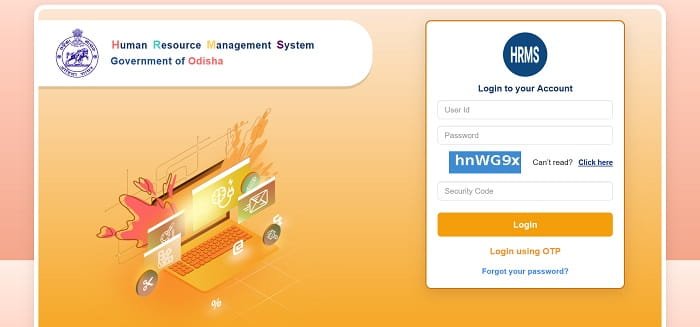
HRMS Odisha Portal Login Process
Government employees can access the portal through: https://apps.hrmsodisha.gov.in/index.htm
Official Login Details
- User ID: HRMS User ID or department-issued username
- Password: Password linked to the employee’s HRMS account
- Captcha: Security characters displayed on the login page
The portal offers login through username and password, OTP and e-Pramaan. It also provides a password-reset option.
How to Login Step by Step
- Open https://apps.hrmsodisha.gov.in/index.htm in an updated browser.
- Enter your HRMS username or User ID.
- Type the correct password.
- Enter the captcha shown on the screen.
- Click Login to open the employee dashboard.
For OTP access, select Login Using OTP. The one-time password is sent to the mobile number registered in the employee’s HRMS profile.
First-Time Users
HRMS Odisha is not open for public registration. It can be accessed only by Government of Odisha employees whose profiles have been created in the system.
A new employee should contact the establishment section, HRMS coordinator or District Coordinator for a User ID and password. The login page also advises employees to contact their District Coordinator when credentials are required.
Key Features of HRMS Odisha
1. e-Service Book
The e-Service Book contains the employee’s career history, including appointment date, designation, office, posting history, promotions and increments.
Employees can review their information and request correction when details are missing or incorrect. Such requests are examined by the Drawing and Disbursing Officer, or DDO, or an authorised establishment official.
2. Leave Management
Employees can apply for leave online and send the request to the competent authority. Approved transactions update the employee’s Leave Account.
The concerned authority can examine the application and provide an approval, rejection or response through the online system.
3. Salary and Payslip Records
HRMS maintains salary-related information and supports payroll administration. Depending on the permissions available, employees may view salary records and monthly payslip details after logging into their accounts.
The platform also helps authorised offices prepare and maintain employee salary accounts.
4. Loan Account
Employees can submit eligible loan or advance-related requests through HRMS. The system records sanctioned amounts, repayments, recoveries and official adjustments in the employee’s Loan Account.
5. Performance Appraisal
HRMS supports electronic performance appraisal for eligible government officers. Employees can submit appraisal information online, while reporting and reviewing authorities process it through the portal.
This reduces the movement of physical appraisal files between departments and offices. The portal also publishes notifications connected with e-PAR processing and deadlines.
6. Online Property Statement
Eligible employees and officers can submit annual property statements through HRMS according to government instructions and notified deadlines.
Property-return information can be searched according to the financial year, employee details, office, department or cadre.
7. Transfers and Promotions
Authorised authorities can record transfer, promotion and deputation orders through the HRMS platform. These transactions become part of the employee’s digital service history.
This helps departments maintain updated records without depending entirely on separate physical registers.
8. Requests and Grievances
Employees can submit service-related reports, requests and grievances online. The concerned office can examine the matter and provide a sanction, rejection or reply through HRMS.
Employees facing technical problems can also raise an online support ticket after logging into their HRMS account.
9. Pension Processing
HRMS helps retiring employees prepare pension papers using available service records. It also helps authorities process retirement cases because important employment information is already stored digitally.
Accurate and updated service records can reduce repeated data entry during pension preparation and verification.
Benefits of HRMS Odisha
1. Saves Time
Routine requests can be submitted online, reducing repeated visits to establishment, accounts and administrative sections.
2. Improves Record Management
The platform connects Service Book, leave, salary, loan and other personnel records within one system.
3. Reduces Paperwork
Digital applications, approvals, appraisals and service records reduce dependence on physical files and registers.
4. Improves Transparency
Employees can review available information and follow their online requests more easily.
5. Supports Retirement Processing
Digitised service records make pension preparation and verification more organised when employee information is complete.
Troubleshooting Common Issues
1. Forgot Password
Open https://apps.hrmsodisha.gov.in/index.htm and click Forgot Your Password. Enter the 10-digit mobile number registered in HRMS, date of birth and captcha.
After OTP verification, create a new password. It must contain at least eight characters, including uppercase and lowercase letters, a number and a special character.
2. OTP Not Received
Check the mobile network and confirm that the registered mobile number is active. If the number is outdated, contact the establishment section or authorised HRMS official.
3. Incorrect Service Information
Use the e-Service Book correction process or approach the DDO or establishment section with supporting documents. Official data is corrected only after verification and approval.
4. Portal Not Opening
Refresh the page, clear the browser cache or try an updated browser. Temporary maintenance may also affect access.
Confirm that you are opening https://apps.hrmsodisha.gov.in/index.htm before entering your username, password or other personal information.
Conclusion
HRMS Odisha is an important digital employee-management platform for the Government of Odisha. It brings Service Books, leave records, salary information, loans, appraisals, property statements, grievances and pension work into one connected system.
Employees should keep their registered mobile number and service information updated and use only the official login page at https://apps.hrmsodisha.gov.in/index.htm.
Frequently Asked Questions
Q1. Who can use HRMS Odisha?
A: Only Government of Odisha employees who have an HRMS User ID and password can access the system.
Q2. What is the official HRMS Odisha login link?
A: The official employee login page is https://apps.hrmsodisha.gov.in/index.htm.
Q3. Can employees log in using OTP?
A: Yes. The OTP is sent to the mobile number registered in the employee’s HRMS account.
Q4. How can incorrect e-Service Book information be corrected?
A: The employee can submit a correction request or contact the DDO or establishment section with supporting documents.
Q5. Does HRMS Odisha support pension processing?
A: Yes. It helps retiring employees prepare pension papers and assists authorities in processing cases using available service records.