 By Santosh Kumar
 HRMS Globex is an online Human Resource Management System used by authorised employees, managers and HR personnel. It provides role-based access to internal human-resource services available within an employee’s organisation.
The publicly accessible portal does not show the complete employee dashboard before login. Therefore, the exact services visible to each user may differ according to the employee’s department, role, review eligibility and permissions.
Official documents available on the HRMS Globex domain confirm that the platform includes a Performance Management System, commonly called PMS. It supports employee self-reviews, reporting-manager reviews, final reviews and appraisal-letter acceptance.
HRMS Globex Portal Login Process
Employees can access the official portal through: https://hrms.theglobex.com/Web/Default.aspx
The login page requires the following details:
- User name
- Password
The portal does not provide open registration on its public login page. Employees must use the credentials issued or approved by their employer, HR department or authorised administrator.
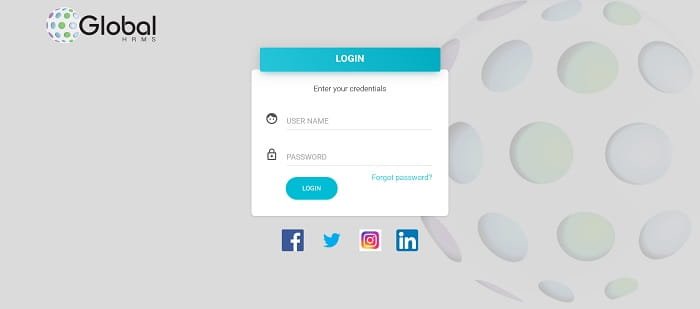
How to Log In to HRMS Globex
Follow these steps to access the employee account:
- Open https://hrms.theglobex.com/Web/Default.aspx.
- Enter the assigned username.
- Type the correct password.
- Click the login or sign-in button.
- Wait for the employee dashboard to open.
- Select the required service from the available menu.
The menus displayed after login depend on the employee’s account permissions. An employee, reporting lead, reviewer and HR administrator may see different options.
Employees should avoid saving their passwords on shared or public computers. They should also sign out properly after completing their work.
First-Time HRMS Globex Users
HRMS Globex does not display an online self-registration option on the public login page. A newly joined employee should contact the concerned HR department or system administrator to confirm whether an HRMS account has been created.
The employee may need to obtain:
- HRMS username
- Employee code
- Initial password
- Registered email address
- Instructions for changing the temporary password
When the credentials do not work, the employee should check for typing errors, unwanted spaces and incorrect letter case before contacting HR.
How to Reset a Forgotten Password
The HRMS Globex login page provides a Forgot password? option. The password-recovery page asks the employee to enter an Employee Code.
The general recovery process is:
- Open the HRMS Globex login page.
- Click Forgot password?
- Enter the Employee Code.
- Continue with the verification instructions shown on the screen.
- Complete the identity-verification process.
- Create or obtain a new password as directed.
- Return to the login page and sign in again.
An employee who does not know the Employee Code should contact the HR department or authorised HRMS administrator. Repeated attempts using incorrect information may delay account recovery.
Key Features of HRMS Globex
1. Employee Login Dashboard
The HRMS portal gives each authorised user access to a personal dashboard. The dashboard acts as the starting point for available employee and performance-management services.
The options shown depend on the user’s role and eligibility. Employees who are not included in a particular review period may not see the same PMS options as eligible employees.
2. Performance Management System
PMS is a confirmed HRMS Globex feature. Eligible employees can open the Performance Review section from the dashboard and begin their self-review.
The official process includes three main stages:
- Employee self-review
- Review by the reporting lead or appraiser
- Final review by the Head of Department or reviewer
This structured workflow allows different participants to complete their responsibilities within the same system.
3. Employee Self-Review
Eligible employees can select their employee code and choose the option to start the review. They must complete all the required fields before submitting the assessment.
The self-review is forwarded to the supervisor only after the employee marks it as completed. Once the final completion option is selected, further changes may not be allowed. Employees should therefore review every entry carefully before submission.
4. Manager and Appraiser Review
After the employee submits the self-review, the reporting lead can complete the team review. The official process recommends a one-to-one discussion between the reporting lead and the employee before the review is completed.
The manager can examine the employee’s performance details and add comments according to the applicable appraisal process.
5. Final Reviewer or HOD Comments
The final stage of the review may be completed by the Head of Department or another authorised reviewer.
This gives the organisation a multi-stage assessment process rather than depending only on the employee’s self-evaluation or the opinion of one reporting manager.
6. Performance Parameters
The PMS manual lists several performance parameters used during assessments. These include efficiency, quality, attendance, ownership, communication, client satisfaction, domain knowledge, technical skills, presentation skills, meeting deadlines, steadiness under pressure and time management.
Employees may be required to provide detailed remarks for individual performance indicators. These comments help managers understand the employee’s work, achievements and overall contribution during the review period.
7. Automatic Performance Data
The official PMS guide states that month-wise information for efficiency, quality and attendance can be updated automatically in the system.
Employees can add comments to explain their performance or provide relevant details. This combines system-generated information with the employee’s own assessment.
8. Draft Auto-Save Facility
HRMS Globex can automatically save an interrupted performance review as a draft. The employee can continue the review after logging in again.
This is useful when the assessment cannot be completed in one session or when the internet connection is interrupted. However, employees should still confirm that all required fields have been completed before final submission.
9. Appraisal Letter Access
Eligible employees may receive their appraisal or review letters through HRMS. An official employee guide explains that users can open the review letter and complete the acceptance process through the portal.
Employees who are part of a review cycle but cannot see the appraisal letter are advised to contact their manager or HR department.
10. Review Acceptance Through Password
The appraisal-letter acceptance process requires the employee to confirm the action using the HRMS password.
This additional credential check helps confirm that the review has been accepted by the authorised employee rather than by another person using the open account.
11. Confidential Review Information
Performance reviews and appraisal letters contain confidential employment information. Official HRMS Globex instructions state that assessments should be completed individually and confidentially.
Appraisal-letter contents should not be shared or discussed with unauthorised people. Employees should also avoid leaving the HRMS account open on a shared computer.
Benefits of HRMS Globex
1. Organised Performance Reviews
Employees, managers and final reviewers can complete different stages of the appraisal process through one platform.
2. Better Tracking
The system provides a structured review flow, making it easier to identify whether an assessment is pending with the employee, reporting lead or final reviewer.
3. Reduced Paperwork
Online self-reviews, manager comments and appraisal acceptance reduce dependence on printed forms and physical files.
4. Draft Protection
The automatic draft-saving facility helps protect information when an employee’s session is interrupted.
5. Role-Based Access
Employees and managers receive access according to their assigned responsibilities, helping keep confidential information within the proper review process.
Troubleshooting Common Problems
1. Username or Password Not Working
Check the spelling, letter case and unwanted spaces. Confirm that the latest password issued or created for the account is being used.
2. Employee Code Not Known
The Employee Code is required for password recovery. Contact the HR department or HRMS administrator when it is unavailable.
3. Performance Review Not Visible
The PMS option may be displayed only to employees included in the current review cycle. Contact the reporting manager or HR department for confirmation.
4. Review Cannot Be Submitted
Check whether every required field has been completed. The official guide states that a self-review cannot be completed when mandatory fields remain empty.
5. Appraisal Letter Not Showing
Employees who are eligible for the review cycle but cannot see their appraisal letter should contact their manager or HR team.
6. Portal Not Opening
Refresh the page, clear the browser cache or use an updated browser. Temporary maintenance, internet problems or server issues may also affect access.
Conclusion
HRMS Globex is an employee-management portal with confirmed facilities for secure login, password recovery, performance self-review, manager assessment, final review and appraisal-letter acceptance.
Employees should use only https://hrms.theglobex.com/Web/Default.aspx and obtain their login credentials directly from their organisation. Since account menus depend on role and eligibility, any missing service should be reported to the concerned HR department or HRMS administrator.
Frequently Asked Questions
Q1. What is the official HRMS Globex portal?
A: The official portal is https://hrms.theglobex.com/Web/Default.aspx.
Q2. Who can use HRMS Globex?
A: Employees, reporting managers, reviewers and authorised HR personnel with valid credentials can access the services assigned to their accounts.
Q3. How can an employee recover a forgotten password?
A: Click Forgot password?, enter the Employee Code and complete the verification process shown by the portal.
Q4. Does HRMS Globex provide performance-review services?
A: Yes. The confirmed PMS workflow includes employee self-review, reporting-lead review and final reviewer or HOD comments.
Q5. Why is the Performance Review option not visible?
A: The option may be available only to employees who are eligible for the active review cycle. The employee should contact the reporting manager or HR department for confirmation.